
Fighter Aircraft Pilot
More Games Like This
Play Fighter Aircraft Pilot online for free—fly iconic military jets with ultra-realistic controls, master takeoff and landing, and complete precision bombing missions. Climb into the cockpit and become an ace today!
This is your call to the skies. Step into the cockpit, feel the rumble of a jet engine, and take command of some of the most iconic and powerful aircraft in aviation history! Play Fighter Aircraft Pilot online for free and immerse yourself in a super-realistic flight simulation where precision, skill, and nerve are all that stand between you and glory. This isn't just a game—it's a training ground for aces.
Your mission, should you choose to accept it, is to master the intricate art of flight. You will learn to execute a flawless takeoff, feel the adrenaline of soaring through the clouds at supersonic speeds, and tackle the ultimate challenge of a perfect landing. Then, when you're ready, you will take on tactical missions, delivering devastating payloads on target with pinpoint accuracy. Are you ready to embrace the challenge, conquer the skies, and become a legendary fighter pilot? The cockpit is open.
Table of Contents
- About
- Key Features
- How to Play
- System Requirements
- Gameplay Deep Dive: The Ultimate Fighter Pilot's Handbook
- A Tale of Two Skies: Free Fly vs. Mission Mode
- The Hangar: A Look at Your Iconic Aircraft
- Pro Tips and Advanced Maneuvers for Aces
- Platform and Availability: A Desktop Cockpit
- Fighter Aircraft Pilot Unblocked: Play Free Online Anywhere
- A Warning About Hacked Versions
- Is Fighter Aircraft Pilot Safe for Kids and Families?
- Similar Games for Simulation and Driving Fans
- Gameplay Video
- Frequently Asked Questions
How to Play
The cockpit of a fighter jet can be an intimidating place. This quick-start guide will get you off the ground and into the sky in five simple steps.
- Start Your Engine: Press and hold the E key until the jet engine roars to life.
- Release the Brake: Press the X key to remove the parking brake. Your aircraft is now ready to roll.
- Increase Throttle: Press the 1 key to gradually increase your engine's power. Your jet will begin to accelerate down the runway.
- Achieve Takeoff Speed: Keep accelerating! A fighter jet needs a lot of speed to get airborne. Watch for your speed to climb past 150-200 knots.
- Take Off!: Gently press and hold the Down Arrow key. This will pitch the nose of your jet up, and you will lift powerfully into the air.
Congratulations, you are now flying a fighter jet! Retract your landing gear (G key, assumed) and explore the skies. For a full breakdown of the dozens of other controls, including combat and landing, consult our deep-dive handbook below.
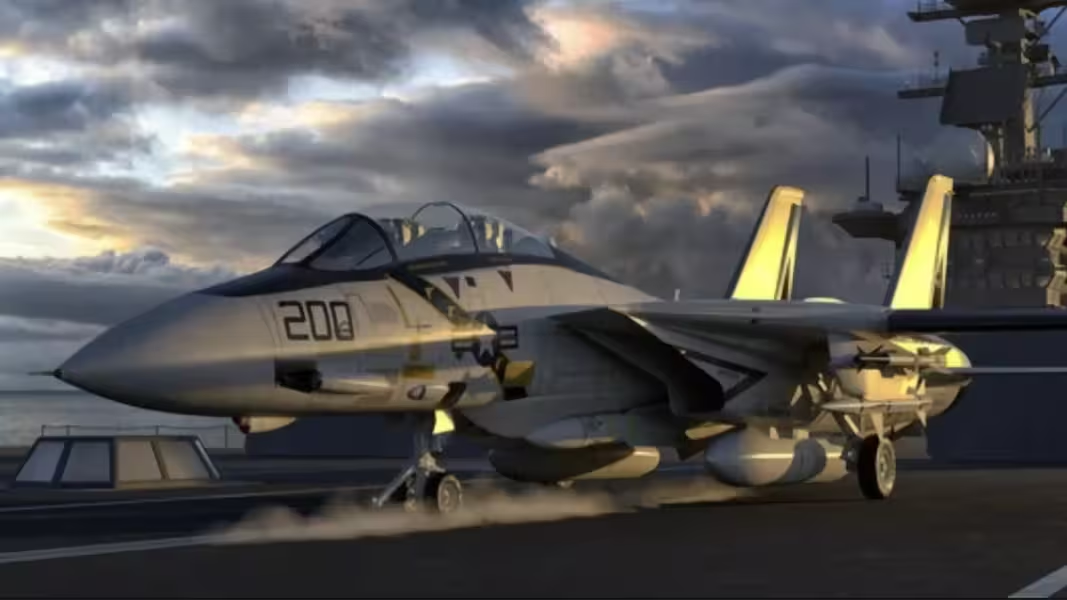
Gameplay Deep Dive: The Ultimate Fighter Pilot's Handbook
To go from a rookie to an ace, you must understand every system of your aircraft. This handbook will guide you through every phase of a successful combat sortie.
Phase 1: Pre-Flight Checklist - Know Your Aircraft
Before you even touch the throttle, understand the machine you are flying. In Free Fly mode, you have access to a range of legendary aircraft. An A-10 Warthog is a slow, heavily armored ground-attack aircraft, perfect for bombing missions but terrible in a dogfight. A modern F-35 Lightning II is a stealthy, multi-role fighter that excels at everything but can be less forgiving for new pilots. A classic WWII plane will be slower and more reliant on basic flying skill. Choose an aircraft that suits your goals for the flight.
Familiarize yourself with your combat HUD (Heads-Up Display). You'll see your airspeed, altitude, and heading, but also crucial combat information like your selected weapon and ammunition count. Knowing what you have equipped before you enter a fight is critical.
Phase 2: The Art of the Takeoff - Power and Precision
A fighter jet takeoff is a display of raw power that requires a steady hand.
- Engine Start (E): Power up your engine.
- Release Park Brake (X): Your jet is now live.
- Set Flaps (F key - assumed): Lower your flaps one stage to increase lift for takeoff.
- Smooth Throttle (1 key): Unlike a car, you don't just floor it. Smoothly increase your throttle to full power.
- Engage Afterburner (I): For a powerful, short-runway takeoff, engage the afterburner. This injects raw fuel into the engine's exhaust, providing a massive burst of thrust. You will feel the acceleration kick in.
- Rotation and Liftoff (Down Arrow): At rotation speed (check your aircraft's specifics, but it will be high), gently pull back. The powerful jet will leap into the air. Do not pull back too hard, or you risk a dangerous "tail strike."
- Positive Climb and Gear Up: Once you are climbing, raise your landing gear (G key) to clean up the aircraft and reduce drag. You are now "clean and climbing."
Phase 3: Mastering the Skies - A Guide to Your Controls
A fighter pilot has a huge number of systems to manage. Here is a breakdown of your key controls:
- Primary Flight Controls (Arrow Keys): As standard, these control your pitch (up/down) and roll (left/right).
- Throttle (1/2): Use '1' to increase power and '2' to decrease. This is for your main engine power, separate from the afterburner.
- Afterburner (I): This is your "sprint" button. It consumes fuel at a massive rate but provides incredible acceleration and speed. Use it to intercept enemies, dodge missiles, or for powerful vertical climbs.
- Brakes (Space bar / P): The Space bar is your wheel brake lever for slowing down on the ground. The P key engages the reverse burner or thrust reverser, a powerful system on jets that redirects engine thrust forward to dramatically slow you down after landing.
- Fuel Management (5/6): The 5 key allows you to dump fuel. In a real combat scenario, a pilot might do this to reduce weight and dramatically increase maneuverability in a dogfight. The 6 key allows you to magically refill fuel, a handy simulator feature for extending your practice time.
- Lights (V): Toggles your aircraft's external lights, useful for night operations or just for cool visuals.
Phase 4: Combat Operations - The Mission Phase
In Mission Mode, you are a weapon. Your job is to deliver ordnance on target with precision.
Air-to-Ground: The Bombing Run
This is a test of precision flying.
- Approach High: Approach the target area from a high altitude. This keeps you safe from ground fire and gives you a clear view of the objective.
- Identify Your Target: Locate the specific objective you need to bomb.
- Initiate a Shallow Dive: Point your jet's nose down in a shallow dive (10-20 degrees) towards the target. This stabilizes your flight path and makes aiming easier.
- Select Your Weapon (Mouse Scroll): Use the mouse scroll wheel to cycle through your available weapons and select your bombs.
- Release Ordnance (L): Timing is everything. You must press the L key to drop your bomb *before* you are directly over the target. The bomb will travel forward with your plane's momentum. You will need to practice to get a feel for the right release point.
- Egress: As soon as the bomb is away, pull up, engage your afterburner (I), and exit the target area at high speed to avoid any potential anti-aircraft fire.
Air-to-Air: Gunnery
If you encounter enemy aircraft, you'll use your cannon (LMB). Just like in a dogfight, you must lead your target. Aim your plane's nose where the enemy is *going to be*, not where they are, and fire a short, controlled burst.
Phase 5: The Ultimate Challenge - A Perfect Landing
Landing a high-speed fighter jet is one of the most difficult and satisfying skills in aviation.
- The Approach: Line up with the runway from miles away. A jet cannot make sharp turns at low speed.
- Slow Down: This is critical. Reduce your throttle ('2' key) dramatically. You need to be slow, but not so slow that you stall. This is called being "on the edge of the envelope."
- Gear Down, Flaps Down: Lower your landing gear (G) and your flaps (F). This configures your jet for landing, creating drag and lift.
- The "Glide Slope": Your goal is a stable, constant descent. Aim to keep the start of the runway in a fixed position on your screen. Use tiny adjustments of the throttle and your pitch controls (arrow keys) to stay on this imaginary line.
- Touchdown: Unlike a small plane, you don't "flare" a jet as much. You fly it directly onto the runway. Aim to touch down firmly on the main landing gear.
- Slowing Down: The moment you touch down, cut the throttle to idle (hold '2'), engage the reverse burner (P), and apply the wheel brakes (Space bar). You will slow down very quickly. Stay on the centerline until you come to a stop.
A Tale of Two Skies: Free Fly vs. Mission Mode
The game offers two distinct modes to cater to your piloting mood.
Free Fly Mode: Your Personal Sandbox
This is the heart of the simulation experience. In Free Fly, you have complete freedom. You can choose from the entire impressive hangar of fighter planes, from iconic WWII models to cutting-edge modern jets like the F-35, and even unique aircraft like the KC-10 tanker. You can take off from any of the available airfields and simply explore the massive 3D world at your own pace. This mode is your training ground. It's where you will crash, where you will learn, and where you will master the intricate art of flying without the pressure of a ticking clock or a mission objective. Spend as much time as you can here to get a feel for flight before tackling the challenges of Mission Mode.
Mission Mode: The Test of a True Ace
For those who crave a challenge, Mission Mode provides a series of ten handcrafted combat scenarios. These missions will test your tactical prowess and your flying capabilities under pressure. You will be tasked with finding and destroying specific ground objectives, requiring you to use all the skills you've learned. You'll need to navigate to the target area, perform a precise bombing run, and return to base, all while managing your fuel and aircraft. Precision, skill, and flawless execution are paramount to success in this mode.
The Hangar: A Look at Your Iconic Aircraft
The game lets you pilot a fantastic array of legendary aircraft, including:
- A-29 Super Tucano: A light attack, counter-insurgency aircraft. It's a modern turboprop plane, which is relatively slow but highly maneuverable, making it a great platform for learning ground-attack principles.
- A-10 Thunderbolt II ("Warthog"): The king of ground attack. This aircraft is slow, incredibly durable, and built around a massive cannon. It's the perfect plane for the bombing missions.
- F-35 Lightning II: A cutting-edge, 5th-generation stealth multi-role fighter. It is extremely fast, highly maneuverable, and packed with advanced technology. A true top-tier jet.
- KC-10 Extender: A massive aerial refueling tanker. While not a fighter, flying this colossal aircraft presents its own unique and immense challenge of managing its weight and momentum.
- Legendary WWII Planes: Step back in time and pilot classic warbirds from the Second World War, experiencing the raw, stick-and-rudder skill required of the pilots of that era.
Pro Tips and Advanced Maneuvers for Aces
- Energy Management is Everything: Your speed and altitude are your "energy." An ace pilot is always thinking about how to trade one for the other. Use a dive to gain speed for an attack run, and then use that excess speed to climb back up to a safe altitude. Never fly low and slow unless you are landing.
- The High-G Turn: To make the tightest turn possible in a jet, you need to be at the right speed (not too fast, not too slow) and pull back hard on the stick. You might need to use your afterburner to maintain energy during the turn.
- Bombing with the HUD: Many flight simulators have a "pipper" or aiming reticle on the HUD that shows you where your bombs will land. Learn to trust this instrument for pinpoint accuracy on your bombing runs.
- The Joy of "Free Look": While not an explicit control, many simulators allow you to hold a key to look around the cockpit. Use this to keep your eyes on a target while you are turning or to check your six for enemy fighters.
Platform and Availability: A Desktop Cockpit
Fighter Aircraft Pilot is a desktop browser-only simulation. The huge number of complex controls requires a full keyboard for the best and most realistic experience. As such, it is not available for mobile devices.
You can climb into the cockpit and experience this incredible combat flight simulator for free, right here on our site. No downloads are needed to begin your journey to becoming an ace.
Fighter Aircraft Pilot Unblocked: Play Free Online Anywhere
Thanks to its browser-based design, Fighter Aircraft Pilot is an excellent "unblocked" game. It runs directly on a webpage using HTML5 (Unity WebGL) technology, which allows you to access it from school or work networks that might block other types of games. It’s the perfect choice for a deep, engaging, and educational break where you can learn the complexities of modern aviation.
A Warning About Hacked Versions
As a browser game, there are no official "MOD APK" or "hacked" versions of Fighter Aircraft Pilot. Any website claiming to offer a downloadable version with cheats should be avoided as they are not legitimate and could pose a security risk. The true satisfaction of a simulator comes from the challenge of mastering it, not from cheating.
Is Fighter Aircraft Pilot Safe for Kids and Families?
Fighter Aircraft Pilot is a combat simulation suitable for most ages, particularly teens and older kids. The game revolves around military aircraft and completing missions that involve bombing inanimate ground targets. The violence is not graphic; there is no blood or gore. The primary focus is on the technical skill and challenge of piloting the aircraft. It's a fantastic educational tool for anyone interested in aviation and technology.
Similar Games for Simulation and Driving Fans
If you love the thrill of mastering a complex machine, be sure to check out these other top-tier titles:
- Aces of the Sky: Epic Dogfights: Another fantastic 3D aerial combat game that focuses more on classic dogfighting and epic boss battles against giant warships.
- Airplane Simulator: Explore open skies in a free-flying simulator—practice stunts, navigation, and smooth landings across varied environments.
- Crazy Plane Landing: An arcade challenge where you battle turbulence, engine issues, and tight runways to nail the perfect landing.
- Jet Fighter Airplane Racing: High-traffic sky racing meets intense dogfights—dodge airliners, unleash missiles, and dominate the leaderboard.
Watch Fighter Aircraft Pilot Gameplay – Play Online for Free
Play Fighter Aircraft Pilot – Master realistic military jets in your browser—train in Free Fly or tackle 10 precision combat missions. directly in your browser with no download. Enjoy fast, free gameplay on any device!
Frequently Asked Questions
How do you take off in this game?
First, press E to start the engine. Press X to release the park brake. Press 1 to increase the throttle to full power. Once you have a high speed (e.g., 150-200 knots), gently hold the Down Arrow key to pitch the nose up and lift off the runway.
What is the difference between Free Fly and Mission Mode?
In Free Fly mode, you have the freedom to choose any plane and fly anywhere in the world without any objectives. It is a sandbox for practice. In Mission Mode, you are given ten specific combat scenarios where you must fly to a target and destroy it with your bombs.
What does the afterburner do?
The afterburner, activated with the I key, provides a massive, temporary boost in engine power and speed. It is perfect for fast takeoffs, intercepting targets, or escaping dangerous situations, but it consumes fuel at a very high rate.
How do you land the plane?
Landing is a complex process. You must reduce your speed, lower your landing gear and flaps, and maintain a gentle, stable descent towards the runway. Just before touchdown, you "flare" by pulling the nose up slightly, then use the reverse burner (P) and wheel brakes (Space bar) to slow down on the ground.
Can I play Fighter Aircraft Pilot on my mobile phone?
No, this is a desktop-only browser game. The large number of keys required for the realistic controls makes it unsuitable for mobile devices.
What is "dumping fuel" for?
Pressing the 5 key to dump fuel makes your aircraft lighter. In real combat, a lighter plane is more maneuverable and can turn tighter in a dogfight. It's an advanced tactical option for when you need maximum performance.